Tutoriale "cum sa" scrise de Raducan. "Capacitatile se dezvolta si se arata din ce in ce mai mult cu fiecare sarcina noua primita." Baltasar Gracian
luni, 6 august 2012
Shortcuts in Windows with special keys. (medium level)
Print Screen - Copy screen image to the clipboard
Alt + Print Screen - Copy image of active window to the clipboard
Windows Key + E - Opens Windows Explorer
Windows Key + D - Show / Hide desktop
Windows Key + F - Opens the Find
Windows Key + M - Minimize all windows
Windows Key + Shift + M - restores window sizes
Windows Key + R - Opens the Run
Windows Key + Break - System Properties window open
Windows Key + L - Switch user
* the key "Windows key" is usually between left alt key and left ctrl key and looks like this:
F1 - Opens Help
F2 - Rename file / folder selected
F3 - Opens the Find
Alt + F4 - Close the window / application active
F5 - Refresh the contents of the selected window
Ctrl + F6 - If an application has opened more documents move from one to another
Ctrl + C - Copy
Ctrl + X - Cut
Ctrl + V - Paste
Ctrl + O - Open
Ctrl + W - Close
Ctrl + S - Save
Ctrl + N - New
Ctrl + P - Print
Ctrl + Z - Undo
Ctrl + A - Select all
Cuvinte cheie:
how to
,
keyboard
,
refresh
,
windows
,
windows key
,
windows shortcuts
How do you refresh a Web page?
Ways to refresh a web page (a website):
In Mozilla Firefox:
- Press the F5 key
- Press CTRL + F5
- Press CTRL + R
- Press CTRL + SHIFT + R (a different refresh)
In Internet Explorer:
- Press the F5 key
- Press CTRL + F5
- Press CTRL + R
In Google Chrome
- Press the F5 key
- Press CTRL + F5
- Press CTRL + R
- Press CTRL + SHIFT + R (a different refresh)
In other browsers in a future update.
Until then: only better!
In Mozilla Firefox:
- Press the F5 key
- Press CTRL + F5
- Press CTRL + R
- Press CTRL + SHIFT + R (a different refresh)
In Internet Explorer:
- Press the F5 key
- Press CTRL + F5
- Press CTRL + R
In Google Chrome
- Press the F5 key
- Press CTRL + F5
- Press CTRL + R
- Press CTRL + SHIFT + R (a different refresh)
In other browsers in a future update.
Until then: only better!
Cuvinte cheie:
ctrl
,
f5
,
google
,
google chrome
,
internet explorer
,
mozilla firefox
,
refresh
,
web pages
,
web sites
joi, 26 ianuarie 2012
Frecventa GSP TV pe RDS in Sibiu
Frecventa GSP TV in Sibiu pe reteaua celor de la RDS este de: 847.25 Mhz
Cuvinte cheie:
frecventa GSP
,
GSP
,
GSP TV
,
petrica da pe GSP
,
rds
sâmbătă, 10 decembrie 2011
Telecomanda Programabila Watson URC 22B-6N Universal (HZ 9205) Coduri pentru televizor Akai
Codurile pentru telecomanda Watson URC 22B-6N (HZ 9205) pentru televizoare marca Akai sunt urmatoarele:
O sa revin cu alte posturi cu alte coduri pentru aceeasi telecomanda dar pentru alte marci de televizoare.
005, 159, 169
O sa revin cu alte posturi cu alte coduri pentru aceeasi telecomanda dar pentru alte marci de televizoare.
Cuvinte cheie:
akai
,
coduri akai
,
coduri telecomanda programabila
,
telecomanda programabila
,
telecomanda watson
,
televizor akai
,
watson
joi, 8 decembrie 2011
Cum sa boot-ezi de pe CD?
Cum sa faci calculatorul sa boot-eze de pe CD? Fara sa faci modificari in BIOS-ul calculatorului.
Ca sa boot-eze de pe CD trebuie sa apesi tasta F11 sau, dupa caz, F12 ca sa iti apara meniul de boot (boot menu) din care vei putea sa iti alegi HDD-ul, CD/DVD-ul sau, dupa caz, stick-ul bootabil.
Pentru nelamuriri folositi sectiunea de comentarii.
Ca sa boot-eze de pe CD trebuie sa apesi tasta F11 sau, dupa caz, F12 ca sa iti apara meniul de boot (boot menu) din care vei putea sa iti alegi HDD-ul, CD/DVD-ul sau, dupa caz, stick-ul bootabil.
Pentru nelamuriri folositi sectiunea de comentarii.
Cuvinte cheie:
boot
,
boot cd
,
boot-ezi de pe cd
,
F11
,
F12
Cum sa intru in BIOS?
Intrarea in BIOS-ul unui calculator nu este conditionata de sistemul de operare instalat pe acel calculator.
Trebuie stiut din capul locului ca intrarea in BIOS se face inaintea incarcarii sistemului de operare.
Intrarea in BIOS este conditionata de producatorul BIOS-ului si de versiunea BIOS-ului.
Deci fie ca ai instalat Windows XP sau Windows 7 sau Ubuntu sau orice sistem de operare intrarea in BIOS se face apasand aceeasi tasta (in majoritatea cazurilor DEL sau F2) imediat dupa ce ati apasat butonul de power al sistemului de calcul.
Trebuie stiut din capul locului ca intrarea in BIOS se face inaintea incarcarii sistemului de operare.
Intrarea in BIOS este conditionata de producatorul BIOS-ului si de versiunea BIOS-ului.
Deci fie ca ai instalat Windows XP sau Windows 7 sau Ubuntu sau orice sistem de operare intrarea in BIOS se face apasand aceeasi tasta (in majoritatea cazurilor DEL sau F2) imediat dupa ce ati apasat butonul de power al sistemului de calcul.
Cuvinte cheie:
bios
,
bios calculator
,
bios laptop
,
bios windows 7
,
bios windows xp
,
cum intri in BIOS
,
intrare in BIOS
vineri, 2 decembrie 2011
Cum schimbi status-ul cuiva de pe Yahoo messenger
Mai nou a aparut un program care poate schimba status-ul oricarui utilizator de Yahoo Messenger!
STATI LINISTITI NU (CRED) CA ESTE UN VIRUS!
Ca sa nu va mai poata schimba nimeni status-ul de la Yahoo Messenger trebuie sa faceti urmatoarea setare:
Messenger -> Preferences -> Ignore List
Aici trebuie sa bifati Ignore anyone who is not in my Yahoo! Contacts.
Asa ar trebui sa va scuteasca de orice bataie de cap data de un prieten sugubat :)).
Asa am patit-o si eu cand cineva mi-a schimbat statusul de la messenger.
Ca sa schimbati si voi statusul altcuiva o sa va ofer mai tarziu si link-ul unui site care si-a implementat un script de schimbare a statusului de la messenger.
STATI LINISTITI NU (CRED) CA ESTE UN VIRUS!
Ca sa nu va mai poata schimba nimeni status-ul de la Yahoo Messenger trebuie sa faceti urmatoarea setare:
Messenger -> Preferences -> Ignore List
Aici trebuie sa bifati Ignore anyone who is not in my Yahoo! Contacts.
Asa ar trebui sa va scuteasca de orice bataie de cap data de un prieten sugubat :)).
Asa am patit-o si eu cand cineva mi-a schimbat statusul de la messenger.
Ca sa schimbati si voi statusul altcuiva o sa va ofer mai tarziu si link-ul unui site care si-a implementat un script de schimbare a statusului de la messenger.
Cuvinte cheie:
schimb status messenger
,
schimbat status
,
status
,
status messenger
,
status schimbat
duminică, 30 octombrie 2011
Cum sa dai Refresh la o pagina Web?
Modalitati de refresh a unei pagini web (a unui site):
In Mozilla Firefox:
- apesi tasta F5
- apesi CTRL + F5
- apesi CTRL + R
- apesi tastele CTRL + SHIFT + R (un altfel de refresh)
In Internet Explorer:
- apesi tasta F5
- apesi CTRL + F5
- apesi CTRL + R
In Google Chrome:
- apesi tasta F5
- apesi CTRL + F5
- apesi CTRL + R
- apesi tastele CTRL + SHIFT + R (un altfel de refresh)
In alte browsere intr-un update viitor.
Pana atunci: Numai bine!
In Mozilla Firefox:
- apesi tasta F5
- apesi CTRL + F5
- apesi CTRL + R
- apesi tastele CTRL + SHIFT + R (un altfel de refresh)
In Internet Explorer:
- apesi tasta F5
- apesi CTRL + F5
- apesi CTRL + R
In Google Chrome:
- apesi tasta F5
- apesi CTRL + F5
- apesi CTRL + R
- apesi tastele CTRL + SHIFT + R (un altfel de refresh)
In alte browsere intr-un update viitor.
Pana atunci: Numai bine!
Cuvinte cheie:
browser
,
chrome
,
internet
,
internet explorer
,
mozilla firefox
,
pagini web
,
refresh
,
reimprospatare
,
web
duminică, 25 septembrie 2011
Cum sa scapi de Yahoo messenger is unable to download files needed for instalation.Please check firewall setting and retry instalation
Daca la instalarea Yahoo! Messenger-ului primesti eroarea:

"Yahoo messenger is unable to download files needed for instalation.Please check firewall setting and retry instalation"
iata rezolvarea:
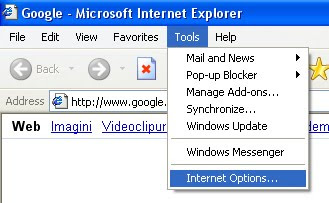
Deschizi Internet Explorer si din meniul de sus alegi:

Tools -> Internet Options
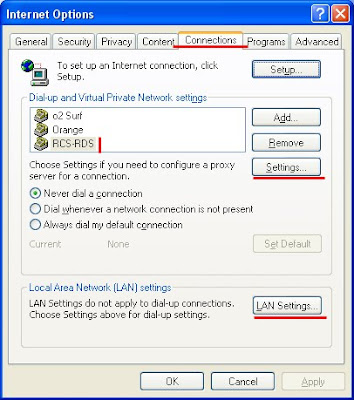
Apoi in fereastra care a aparut te duci la tab-ul Connections

De aici in partea de jos click pe LAN Settings
sau
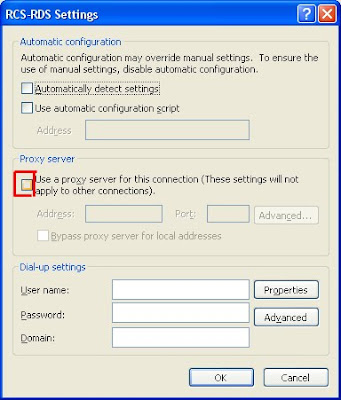
(daca folosesti o conexiune la internet gen stick de orange, vodafone, cosmote, digi .... dai click pe conexiunea respectiva din casuta deasupra careia scrie:"Dial-up and Private Network settings" si apoi din dreapta dai click pe Settings)

Daca ai bifat vreun Proxy server debifeaza-l si totul o sa mearga ca uns.
Daca problema persista pune aici un comment si am sa incerc sa te ajut.

"Yahoo messenger is unable to download files needed for instalation.Please check firewall setting and retry instalation"
iata rezolvarea:
Deschizi Internet Explorer si din meniul de sus alegi:

Tools -> Internet Options
Apoi in fereastra care a aparut te duci la tab-ul Connections

De aici in partea de jos click pe LAN Settings
sau
(daca folosesti o conexiune la internet gen stick de orange, vodafone, cosmote, digi .... dai click pe conexiunea respectiva din casuta deasupra careia scrie:"Dial-up and Private Network settings" si apoi din dreapta dai click pe Settings)

Daca ai bifat vreun Proxy server debifeaza-l si totul o sa mearga ca uns.
Daca problema persista pune aici un comment si am sa incerc sa te ajut.
Cuvinte cheie:
firewall settings
,
internet explorer
,
options
,
Proxy server
,
unable to download files needed
,
yahoo messenger
joi, 1 septembrie 2011
Extension. Prc? How to open PRC files?
Want to read e-books and have them in. Prc? You must know that this is a dubious extension ... I do not understand very well the advantages of the use of .prc and not .pdf because while I played with myself. PRC resembled me. pdf.
It is important that we have found what they can see better after a few minutes of searching on Google and several unsuccessful attempts.
I reached a so-called program, still under testing, FBReader.
To download you need to visit the following link: link.
1. After you click here you must click on "Save file" as you learned so far or if you have not learned you should read here on the blog.
2. Appeared on the desktop icon named "FBReaderSetup-0.10.7", double-click on it.
3. Click on "Run".
4. Click "Next."
5. Click on "Install".
6. Click on "Close".
7. On the desktop has appeared an icon with the name "FBReader", double-click on it and opens the wonderful program that can read .prc files. It can read other e-books formats that I never heard.
I must admit, this program looks very clean without any extra thing that really do not need as a normal user.
8. Leave a comment if you can not handle.
9. Other programs with which you can see .PRCs:
- MobiPoket Reader
It is important that we have found what they can see better after a few minutes of searching on Google and several unsuccessful attempts.
I reached a so-called program, still under testing, FBReader.
To download you need to visit the following link: link.
1. After you click here you must click on "Save file" as you learned so far or if you have not learned you should read here on the blog.
2. Appeared on the desktop icon named "FBReaderSetup-0.10.7", double-click on it.
3. Click on "Run".
4. Click "Next."
5. Click on "Install".
6. Click on "Close".
I must admit, this program looks very clean without any extra thing that really do not need as a normal user.
8. Leave a comment if you can not handle.
9. Other programs with which you can see .PRCs:
- MobiPoket Reader
Cuvinte cheie:
. prc
,
books online
,
e-books
,
extensions
,
FB Reader
,
how to
,
software
Abonați-vă la:
Postări
(
Atom
)