sâmbătă, 24 ianuarie 2026

Cum sa rezolvi eroare la instalare Wordpress

 La instalarea de Wordpress te poti confrunta cu o eroare ca aceasta:

Parse error: syntax error, unexpected '?', expecting variable (T_VARIABLE) in /your-path/wp-includes/compat-utf8.php on line 47


 Daca esti la o instalare fresh de Wordpress cel mai probabil nu ai versiunea necesara de PHP care ruleaza pe serverul unde vrei sa faci aceasta instalare.


Caz concret: Wordpress 6.9 + PHP 7.0 => eroarea de mai sus


Upgrade la PHP 8.2 rezolva problema.

luni, 12 februarie 2024

Cum sa rezolvi eroarea BR-CO-25 (codEroare=BR-CO-25) - EFactura

In prima incercare de a emite prima factura in sistemul eFactura am intampinat o eroare foarte interesanta.

Eraorea era cam asa: 


Fisierul XML factura.xml nu este valid. Au fost identificate urmatoarele erori:

tipAssert=FailedAssert; codEroare=BR-CO-25; localizareEroare=/Invoice/cac:LegalMonetaryTotal/cbc:PayableAmount; textEroare=[BR-CO-25]-In case the Amount due for payment (BT-115) is positive, either the Payment due date (BT-9) or the Payment terms (BT-20) shall be present.; expresieValidata=((. > 0) and (exists(//cbc:DueDate) or exists(//cac:PaymentTerms/cbc:Note))) or (. <= 0)


Am cautat pe internet si nu am prea gasit informatii clare despre cum sa rezolv aceasta eroare insa am mai incercat odata sa o generez.

De aceasta data am trecut o data calendaristica din viitor la campul: "Data scadentei (BT-9)" din prima sectiune "Informatii generale" din aplicatia oferita gratuit de cei de la ANAF: https://www.anaf.ro/CompletareFactura/faces/factura/informatiigenerale.xhtml

Noul xml a putut fi validat pe validatorul pus gratuit la dispozitie tot de cei de la ANAF: https://www.anaf.ro/uploadxmi/


Cumva in mesajul de eroare spune clar ca in caz ca Suma de plată (BT-115) este mai mare decat 0 trebuie ca si campul Data scadentei (BT-9) sau Termeni de plată (BT-20) sa fie completat.


Sper ca ati rezolvat problema!

vineri, 12 ianuarie 2024

Cum sa repari butonul de Sign sau Semneaza cand acesta nu functioneaza in Adobe Reader

    Zilele acestea ma lupt cu semnatura digitala pentru eFactura. Nefiind nevoit sa semnez digital nicio factura sau declaratie pana acum nu am avut semnatura digitala si de anul acesta va trebui sa folosesc si eu asa ceva.

    Fac aceasta postare sa vin in ajutorul tau, antreprenor sau nu, care te lovesti de aceeasi problema.

    Am achizitionat certificatul digital, l-am activat si cand sa semnez si eu primul document cu ajutorul lui m-am lovit de problema butonului de Semneaza sau Sign (depinde in ce limba ai instalat Adobe Reader).

    In cazul meu ajungeam pana in pasul al doilea, dupa ce am selectat certificatul cu care sa semnez documentul si dupa ce alegeam stilul in care sa arate semnatura butonul de Sign sau Semneaza era mort, dadeam click si nu se intampla nimic. Am incercat chiar sa il accesez folosind doar tastatura (navigand cu tasta tab) si sa dau enter sau space, dar tot nimic.

    Rezolvarea in cazul meu a fost in 2 pasi. 

    1. In primul rand am observat ca nu foloseam Adobe Acrobat Reader DC ci ceva diferit tot de la Adobe si l-am dezinstalat.

    2. In al doilea rand am sters folderele Adobe din folderele din AppData asociate cu utilizatorul curent, in cazul meu sunt 3:

        2.1 C:\Users\Raducan\AppData\Local

        2.2 C:\Users\Raducan\AppData\LocalLow

        2.3 C:\Users\Raducan\AppData\Roaming


    Dupa ce am dezinstalat Adobe Reader pe care-l aveam inainte (era si pe 32 de biti in loc de 64, asa cum am sistemul de operare) am instalat Adobe Acrobat Reader DC din Microsoft Store, asa arata: 

    Acum ca am terminat instalarea am reusit in sfarsit sa folosesc si butonul de Sign sau Semneaza.

    Astept in comentarii parerile voastre daca ati reusit sa rezolvati problema sau nu.

luni, 11 noiembrie 2019

Cum sa investesti bani atunci cand nu ai prea multi

Am gasit cateva metode de a investi bani atunci cand nu ai multi si as vrea sa le impartasesc si cu voi. De ceva timp ma tot joc cu platforma Crowdestor, va recomand si voua sa o incercati.
Momentan sunt putine proiecte dar au dobanzi foarte atractive.

Va recomand sa cantariti bine inainte sa va investiti banii in orice pentru ca exista si riscul de a pierde bani. Eu doar va prezint modalitatile gasite de mine sa investesti bani putini. Nu sunt un expert in investitii.

duminică, 2 martie 2014

Cum sa scapi de reclamele enervante de pe site-uri si de pe videoclipuri?

Cum sa scpai de reclamele de pe site-uri? Metoda este foarte simpla, tot ce ai de facut, daca utilizezi Mozilla Firefox, este sa iti instalezi 'un addon' la firefox, sau 'un supliment' daca ai instalat Firefox-ul in limba romana.
Cum sa instalezi acest supliment in Firefox? Trebuie doar sa urmezi cu strictete pasii de mai jos:

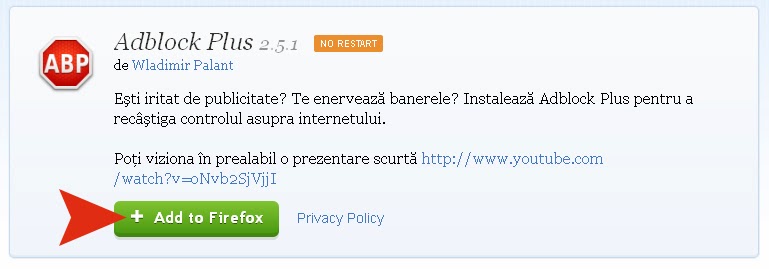
1. Urmeaza acest link (se deschide in alt tab): https://addons.mozilla.org/ro/firefox/addon/adblock-plus/
2. Asteapta sa se incarce pagina de tot si apoi click pe butonul verde pe care scrie "Add to Firefox".
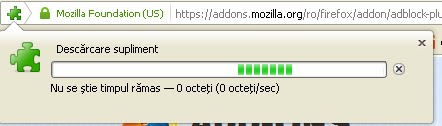
 3. Asteapta pana se incarca bara verde de la "Descarcare supliment".
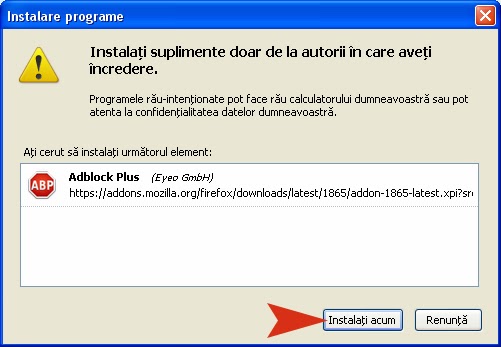
 4. Click pe butonul "Instalati acum".
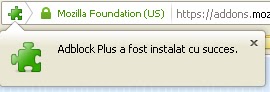
 5. In cele din urma astepti pana iti apare mesajul "Adblock Plus" a fost instalat cu success.
 
6. Gata.

 Daca link-ul nu mai functioneaza sau apar alte probleme scrie in comentariu si o sa incerc sa remediez postarea.


duminică, 26 ianuarie 2014

Cum sa scapi de eroarea failed to get proc address for getlogicalprocessorinformation(kernel32.dll)

Aceasta eroare poate sa apara cand ai instalat Skype versiunea 6.13 pe o versiune de Windows XP SP2 sau mai veche cum ar fi SP1.

Ca sa scapi de eroarea "failed to get proc addres for getlogicalprocessorinformation(kernel32.dll)" trebuie sa dezinstalezi prima data versiunea 6.13 de Skype si apoi de pe acest link descarci versiunea 6.6 si eroarea ar trebui sa dispara http://download.skype.com/msi/SkypeSetup_6.6.0.106.msi

Nu uita sa lasi comment sau sa faci o donatie, dreapta, sus, butonul Donate, prin Paypal (pentru fructe).

vineri, 10 mai 2013

How to increase the maximum sql file size for phpMyAdmin database import

How to increase the maximum sql file size for phpMyAdmin database import?

 
As you must know allready, the phpMyAdmin script uses php to upload files like .sql files.
To increase this limit you must change a setting from php.ini.
Usually it is located to this path: /etc/php.ini or /etc/php/php.ini or /etc/php5/php.ini
What you will need to change is the value of this variable: post_max_size.
The value is in MB.
After that you need to restart apache on your server.
If you don't have access to this file you must call your hosting team.

Have a nice day.
Donate & Share if you care.

vineri, 22 martie 2013

Cum sa faci un site. Structura simpla pentru o pagina web

Structura simpla pentru o pagina web trebuie sa contina urmatoarele sectiuni:

<head></head>

si

<body></body>

Ambele trebuiesc incluse in sectiunea <html></html> deci codul devine:

<html>
<head></head>
<body>
</body></html>

In sectiunea <head></head> vor fi incluse toate datele care nu se vad la prima vedere dar care sunt foarte importante.

In sectiunea <body></body> vor fi toate elementele vizibile (sau invizibile) in browserul utilizatorului.

Pentru a testa codul de mai sus haideti sa ii adaugam niste elemente vizibile si cateva elemente necesare si sa il vizualizam intr-un browser.

In sectiunea <head> ii mai adaugam elementul <title>Prima pagina web</title> textul introdus intre delimitatoarele <title> si </title> va aparea in bara de sus a ferestrei browserului.</head>

In sectiunea <body> ii vom adauga un asa numit element de titlu (de aceasta data mult mai vizibil). Acest element are ca delimitatoare <h1> si </h1> .</body>

Codul va deveni:

 <html>  
 <head>  
 <title>Prima pagina web</title>  
 </head>  
 <body>  
 <h1>Acesta este un titlu pe prima mea pagina web</h1>  
 </body>  
 </html>  

Vom scrie acest cod intr-un fisier nou creat oriunde pe calculator si denumit prima.html (observati ca extensia este .html, ca sa faceti acest lucru creati un fisier text simplu, adaugati codul, salvati apoi schimbati extensia din txt in html).

Apoi daca vom deschide acest fisier cu dubluclick se va deschide browserul implicit afisand prima pagina web creata.


Normal, acest exemplu nu arata bine dar pe parcurs vom invata cum sa il facem mai atractiv.

Am evidentiat cele doua elemente vizibile <title></title> si
<h1> </h1> pentru a va fi mai usor sa faceti legatura intre cod si pagina asa cum este ea vizibila intr-un browser.

Daca va placut si v-ati descurcat lasati un comentariu mai jos. Sau daca aveti nevoie de ajutor tot un comentariu sa scrieti.

luni, 6 august 2012

Shortcuts in Windows with special keys. (medium level)


Print Screen - Copy screen image to the clipboard

Alt + Print Screen - Copy image of active window to the clipboard


Windows Key + E - Opens Windows Explorer
Windows Key + D - Show / Hide desktop
Windows Key + F - Opens the Find
Windows Key + M - Minimize all windows
Windows Key + Shift + M - restores window sizes
Windows Key + R - Opens the Run
Windows Key + Break - System Properties window open
Windows Key + L - Switch user

* the key "Windows key" is usually between left alt key and left ctrl key and looks like this:


F1 - Opens Help
F2 - Rename file / folder selected
F3 - Opens the Find
Alt + F4 - Close the window / application active
F5 - Refresh the contents of the selected window
Ctrl + F6 - If an application has opened more documents move from one to another

Ctrl + C - Copy
Ctrl + X - Cut
Ctrl + V - Paste
Ctrl + O - Open
Ctrl + W - Close
Ctrl + S - Save
Ctrl + N - New
Ctrl + P - Print
Ctrl + Z - Undo
Ctrl + A - Select all

How do you refresh a Web page?

Ways to refresh a web page (a website):
In Mozilla Firefox:
- Press the F5 key
- Press CTRL + F5
- Press CTRL + R
- Press CTRL + SHIFT + R (a different refresh)

In Internet Explorer:

- Press the F5 key
- Press CTRL + F5
- Press CTRL + R

In Google Chrome

- Press the F5 key
- Press CTRL + F5
- Press CTRL + R
- Press CTRL + SHIFT + R (a different refresh)

In other browsers in a future update.
Until then: only better!

joi, 26 ianuarie 2012

Frecventa GSP TV pe RDS in Sibiu

Frecventa GSP TV in Sibiu pe reteaua celor de la RDS este de: 847.25 Mhz

sâmbătă, 10 decembrie 2011

Telecomanda Programabila Watson URC 22B-6N Universal (HZ 9205) Coduri pentru televizor Akai

Codurile pentru telecomanda Watson URC 22B-6N (HZ 9205) pentru televizoare marca Akai sunt urmatoarele:

005, 159, 169


O sa revin cu alte posturi cu alte coduri pentru aceeasi telecomanda dar pentru alte marci de televizoare.

joi, 8 decembrie 2011

Cum sa boot-ezi de pe CD?

Cum sa faci calculatorul sa boot-eze de pe CD? Fara sa faci modificari in BIOS-ul calculatorului.
Ca sa boot-eze de pe CD trebuie sa apesi tasta F11 sau, dupa caz, F12 ca sa iti apara meniul de boot (boot menu) din care vei putea sa iti alegi HDD-ul, CD/DVD-ul sau, dupa caz, stick-ul bootabil.
Pentru nelamuriri folositi sectiunea de comentarii.

Cum sa intru in BIOS?

Intrarea in BIOS-ul unui calculator nu este conditionata de sistemul de operare instalat pe acel calculator.
Trebuie stiut din capul locului ca intrarea in BIOS se face inaintea incarcarii sistemului de operare.
Intrarea in BIOS este conditionata de producatorul BIOS-ului si de versiunea BIOS-ului.
Deci fie ca ai instalat Windows XP sau Windows 7 sau Ubuntu sau orice sistem de operare intrarea in BIOS se face apasand aceeasi tasta (in majoritatea cazurilor DEL sau F2) imediat dupa ce ati apasat butonul de power al sistemului de calcul.

vineri, 2 decembrie 2011

Cum schimbi status-ul cuiva de pe Yahoo messenger

Mai nou a aparut un program care poate schimba status-ul oricarui utilizator de Yahoo Messenger!

STATI LINISTITI NU (CRED) CA ESTE UN VIRUS!

Ca sa nu va mai poata schimba nimeni status-ul de la Yahoo Messenger trebuie sa faceti urmatoarea setare:

Messenger -> Preferences -> Ignore List

Aici trebuie sa bifati Ignore anyone who is not in my Yahoo! Contacts.

Asa ar trebui sa va scuteasca de orice bataie de cap data de un prieten sugubat :)).

Asa am patit-o si eu cand cineva mi-a schimbat statusul de la messenger.

Ca sa schimbati si voi statusul altcuiva o sa va ofer mai tarziu si link-ul unui site care si-a implementat un script de schimbare a statusului de la messenger.

duminică, 30 octombrie 2011

Cum sa dai Refresh la o pagina Web?

Modalitati de refresh a unei pagini web (a unui site):
In Mozilla Firefox:

- apesi tasta F5
- apesi CTRL + F5
- apesi CTRL + R
- apesi tastele CTRL + SHIFT + R (un altfel de refresh)

In Internet Explorer:

- apesi tasta F5
- apesi CTRL + F5
- apesi CTRL + R

In Google Chrome:

- apesi tasta F5
- apesi CTRL + F5
- apesi CTRL + R
- apesi tastele CTRL + SHIFT + R (un altfel de refresh)

In alte browsere intr-un update viitor.
Pana atunci: Numai bine!

duminică, 25 septembrie 2011

Cum sa scapi de Yahoo messenger is unable to download files needed for instalation.Please check firewall setting and retry instalation

Daca la instalarea Yahoo! Messenger-ului primesti eroarea:

"Yahoo messenger is unable to download files needed for instalation.Please check firewall setting and retry instalation"

iata rezolvarea:

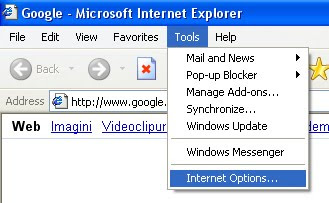
Deschizi Internet Explorer si din meniul de sus alegi:

Tools -> Internet Options

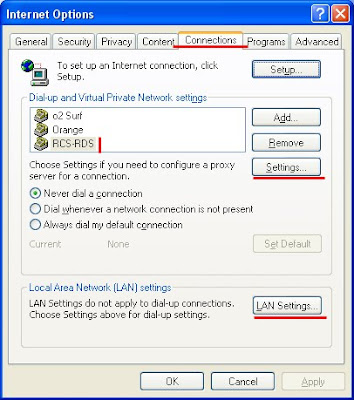
Apoi in fereastra care a aparut te duci la tab-ul Connections

De aici in partea de jos click pe LAN Settings
sau
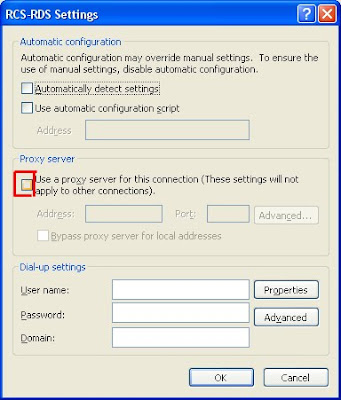
(daca folosesti o conexiune la internet gen stick de orange, vodafone, cosmote, digi .... dai click pe conexiunea respectiva din casuta deasupra careia scrie:"Dial-up and Private Network settings" si apoi din dreapta dai click pe Settings)

Daca ai bifat vreun Proxy server debifeaza-l si totul o sa mearga ca uns.

Daca problema persista pune aici un comment si am sa incerc sa te ajut.

joi, 1 septembrie 2011

Extension. Prc? How to open PRC files?

Want to read e-books and have them in. Prc? You must know that this is a dubious extension ... I do not understand very well the advantages of the use of .prc and not .pdf because while I played with myself. PRC resembled me. pdf.

It is important that we have found what they can see better after a few minutes of searching on Google and several unsuccessful attempts.
I reached a so-called program, still under testing, FBReader.
To download you need to visit the following link: link.

1. After you click here you must click on "Save file" as you learned so far or if you have not learned you should read here on the blog.
2. Appeared on the desktop icon named "FBReaderSetup-0.10.7", double-click on it.
3. Click on "Run".
4. Click "Next."


5.
Click on "Install".


6. Click on "Close".

7. On the desktop has appeared an icon with the name "FBReader", double-click on it and opens the wonderful program that can read .prc files. It can read other e-books formats that I never heard.


I must admit, this program looks very clean without any extra thing that really do not need as a normal user.
8. Leave a comment if you can not handle.

9. Other programs with which you can see .PRCs:

- MobiPoket Reader

How do I open a PDF file?

Have you received or downloaded a .pdf file type and you do not how to open it to read it? You've got in the perfect place.
Today I will show you how to open .pdf files (Portable Document Format).
To view files of this type (.pdf) you need a tool called Adobe Reader from Adobe.
This program is provided free of manufacturing company.
To take possession of his you need to follow these steps:
1. Click here and on the window that appears click on the "Save" or "Save file" button and choose Desktop from the left if you can.
2. After the download is complete close any window that is open excluding this window with instructions.
3. On desktop appeared a new file named "AdbeRdr910_en_US_Std.exe" with or without .exe at the end, it depends.
4. Double-click it and a window may appear:

5. You must click on "Run"
6. Now you have this window appears:

7. Wait until the bar fills with green and this window will appear:

8. Here click on "Next."
9. Then click "Install" and wait ...
10. And finally click on "Finish".
11. If this window appears:

12. You must click on "Yes" to restart the computer. And when you start the computer again, you can simply open .pdf files by double-clicking on them. On first opening a window will appear with "terms and conditions", click on "Accept" and everything is fine.

Congratulations.

Later edit: Leave comments if you find this
tutorial helpful! Thanks.

How to view files in binary mode, decimal or hexadecimal mode

A problem that I faced some time ago is to analyze the files at bit level.

Why I needed to view files at the bit level?
While I worked on homework lab for subject "compression and data encryption". A very interesting matter of fact.
I did not write encrypted or compressed data to files on 8-bit, but on a different numbers of bits. And to check if compression or encryption algorithm works correctly I had to analyze files at bit level (a text viewer do not normally provide this feature).

Solve the problem.
I searched the internet long before I found a free program that lets you view files in several ways, such as:

- Binary view
- Octal view
- Decimal view
- Hex view

The names come from the numerical base in which are data displayed (base 2, base 8, base 10 and base 16).

How is the program called?
Free Hex Editor program called Neo and is freely available for download on this site.

Besides these features the program offers other features that I still have not found / used.
This is a free version, full version certainly offers many features for viewing data files.